AI Palette Usage
Who this is for: developers using natural-language prompts to populate calculator operations.
Estimated read time: 3 minutes.
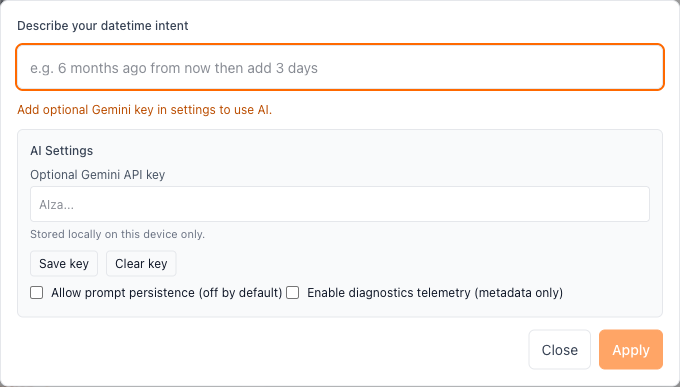
Example view: command palette opened and ready for natural-language datetime input.
What it does
The command palette converts prompt text into visible calculator operations.
- Open:
Cmd/Ctrl + K - Submit:
Apply - Result: operation rows update directly in the calculator
Requirements
- Gemini API key configured in AI settings
- Network access for provider request
Without a key, the UI shows a non-blocking setup message.
Prompt style that works best
- “6 months ago from now”
- “add 2 days then subtract 3 hours”
- “starting 2026-02-21 add 1 month”
Recommendation: keep prompts short and operation-oriented.
Failure cases and retry handling
The palette surfaces explicit errors for:
- missing key
- rejected/invalid key
- rate limiting
- timeout/network issues
- unsupported or ambiguous parse output
Retry hints are shown inline with the message.
Transparency and confidence
- Parsed operations are visible and editable before copy actions
- Confidence metadata may highlight low-confidence operation rows
- You can inspect and adjust before exporting outputs
Privacy and telemetry controls
- Prompt persistence follows local AI settings policy
- Telemetry emission is settings-controlled and optional
Recommended operating pattern
For production-oriented use:
- Use explicit start dates when possible
- Verify each applied operation row
- Copy the page URL as reproducible evidence